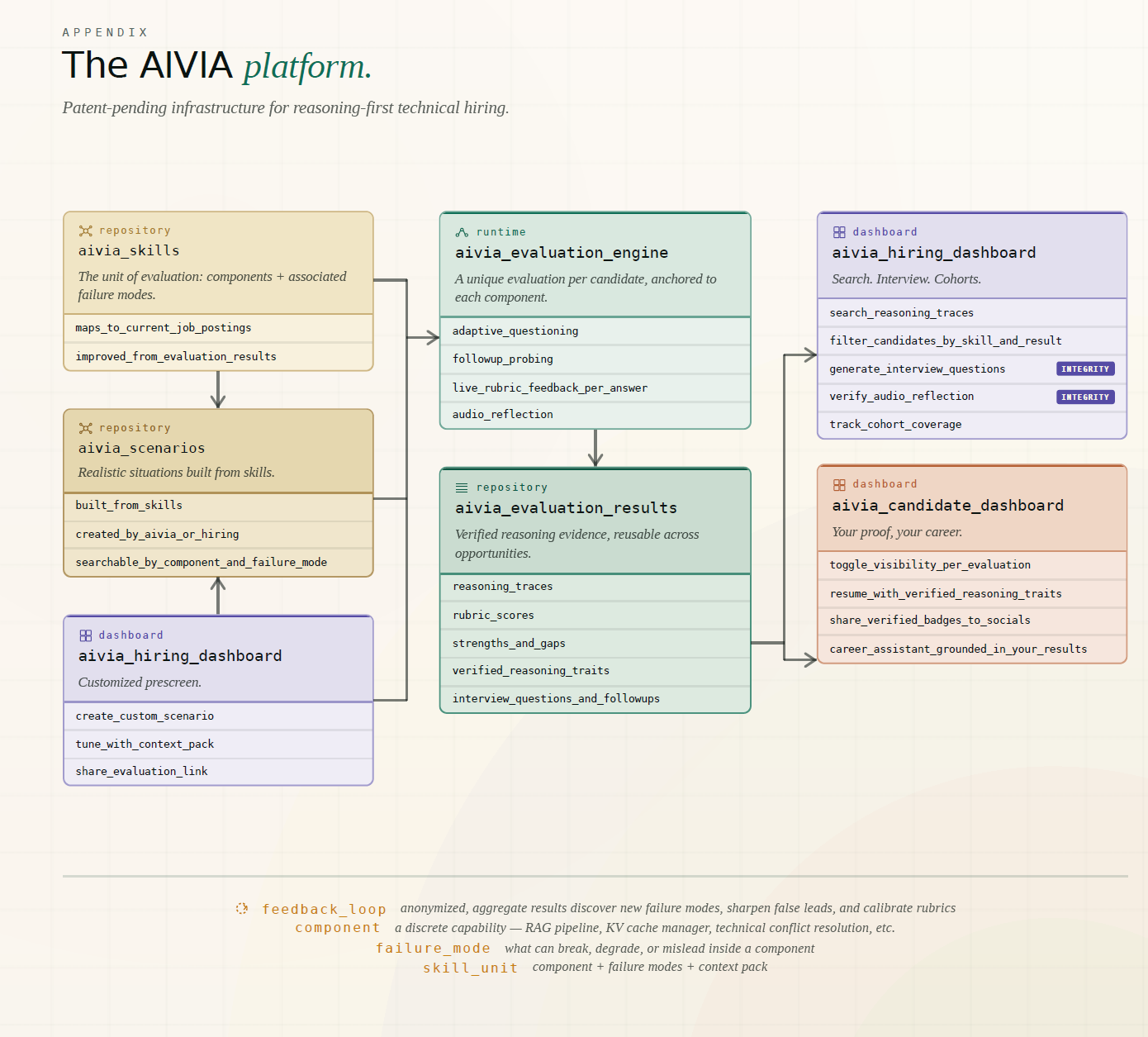
AIVIA indexes more than 1,000 AI labs, research artifacts, and job postings by the technical components they involve.
- Candidates map their work and build reasoning evidence through evaluations.
- Hiring leads search the index and talent pool, then prescreen and interview with that evidence.
- Labs map their research, get insights, and connect to industry.
Pick your path below.
Get started with hiring tools
SEARCH, PRESCREEN, AND INTERVIEW WITH EVIDENCE
01 Search Talent by Evidence
Find candidates by what they’ve actually built and how they reason, not just keywords on a resume.
- Universal search across labs, evaluations, papers, and more, to find the people behind the work
- Discover talent in the AIVIA talent pool, filtered by domain, component, score, and resume tags
- Ask AIVIA to find candidates by reasoning patterns
02 Prescreen with Evaluations
Use evaluations from the AIVIA library or publish your own scenarios for the roles you’re hiring. Every candidate gets the same realistic problem, and you get a full report: rubric scores, strengths, gaps, and per-question analysis. Build shortlists from results instead of guesswork.
03 Interview with Verified Reasoning
Walk into every interview knowing how each candidate thinks. Reports include the full transcript and a voice reflection for verification, so you can skip the basics and go straight to the gaps that matter.
Dedicated Onboarding Included
Purchase a seat, tell us what roles and skill areas you care about, and we help configure your dashboard workflow.
Want to look around first? Create a free account at stemaway.com/signup to browse available evaluation scenarios across domains and components.
Get started with career tools
FROM ACCOUNT TO DISCOVERABLE IN FIVE STEPS
01 Create Your Free Account
Sign up at stemaway.com/signup. Your STEM-Away account is your AIVIA account — one login, everything included.
02 Build Your Component Map
Go to your AIVIA dashboard and open Setup. Upload or paste your resume, then add the evidence sources you want mapped: GitHub repositories, research papers, and datasets. AIVIA builds your component map and suggests evaluations that match it.
03 Take an Evaluation
Evaluations are organized into domains like LLM & Agentic Systems and AI-Assisted Development. The library includes:
- Evaluations published by the AIVIA team
- Evaluations published by hiring teams
Both work exactly the same way, and both add to your portfolio when you take them. Hiring teams searching the talent pool see results across the entire library, not just evaluations they published.
There are a few ways to find one:
- Suggested evaluations from your component map in your dashboard
- Universal search to look up evaluations by domain, component, or topic
- Scenario posts in each category: read the case study, then start the evaluation linked at the bottom
Each evaluation is text-based: 3–5 questions with follow-ups, up to 5 minutes per answer, with scored feedback after each one. You’ll close with a brief voice reflection, and your full report is ready within minutes. You get two attempts; the second replaces the first.
04 Make Yourself Discoverable
Two settings control whether hiring teams can discover you and see your evaluation results:
- Toggle “On Resume” in your AIVIA dashboard for evaluations you want hiring teams to see. Anything toggled off stays private.
- Set job search status to active in My Profile so hiring teams know you’re open to opportunities.
Optional but recommended: add Education, Experience & Location in My Profile to help hiring teams filter and find you faster.
05 Get Found
Hiring teams search the AIVIA talent pool by domain, component, score, and resume tags, and use Ask AIVIA to find candidates by reasoning patterns. With your evaluations On Resume and your job search status active, you show up in their searches.
What You Get — Free
- A component map built from your resume and evidence sources, with suggested evaluations
- Evaluations with real-time, AI-powered feedback
- Full reports with rubric scores, strengths, gaps, and per-question analysis
- Portfolio with badges, proof artifacts, and verified resume tags
- One-click AIVIA Resume generated from your visible evaluations
- AI Career Assistant for guidance based on your actual results
- Two attempts per evaluation
- Visibility in hiring team talent searches
Your evaluation results are yours. You control which ones are visible, and you can reuse them across multiple opportunities.
How evaluations work: AIVIA evaluations are AI-driven conversations that probe how you reason through realistic technical scenarios. Use any resources you want, it’s open-book. But your transcript becomes part of your report, and the voice reflection serves as voice verification. What matters is the quality of your thinking, not what you’ve memorized.
Get started with academia tools
MAP YOUR LAB, GET INSIGHTS, CONNECT TO INDUSTRY
Put Your Lab on AIVIA
Search the lab index by university or lab name.
Found your lab? Claim the workspace to review its sources and component matches, get industry insights tied to its work, and choose what appears on your public lab page.
Not listed yet? Submit your lab’s website for priority indexing.